roborock-webapp
Open source · MIT · Python 3.12 · self‑hosted

Vacuum the carpets first.
Then mop around them.

A self-hosted web app for Roborock robot vacuums that runs multi-step cleans the official app can't. Each step waits for the robot to come home, and settings are read back from the robot before anything starts.

no account needed to tryMIT licensedruns on your machine
SHEET 01
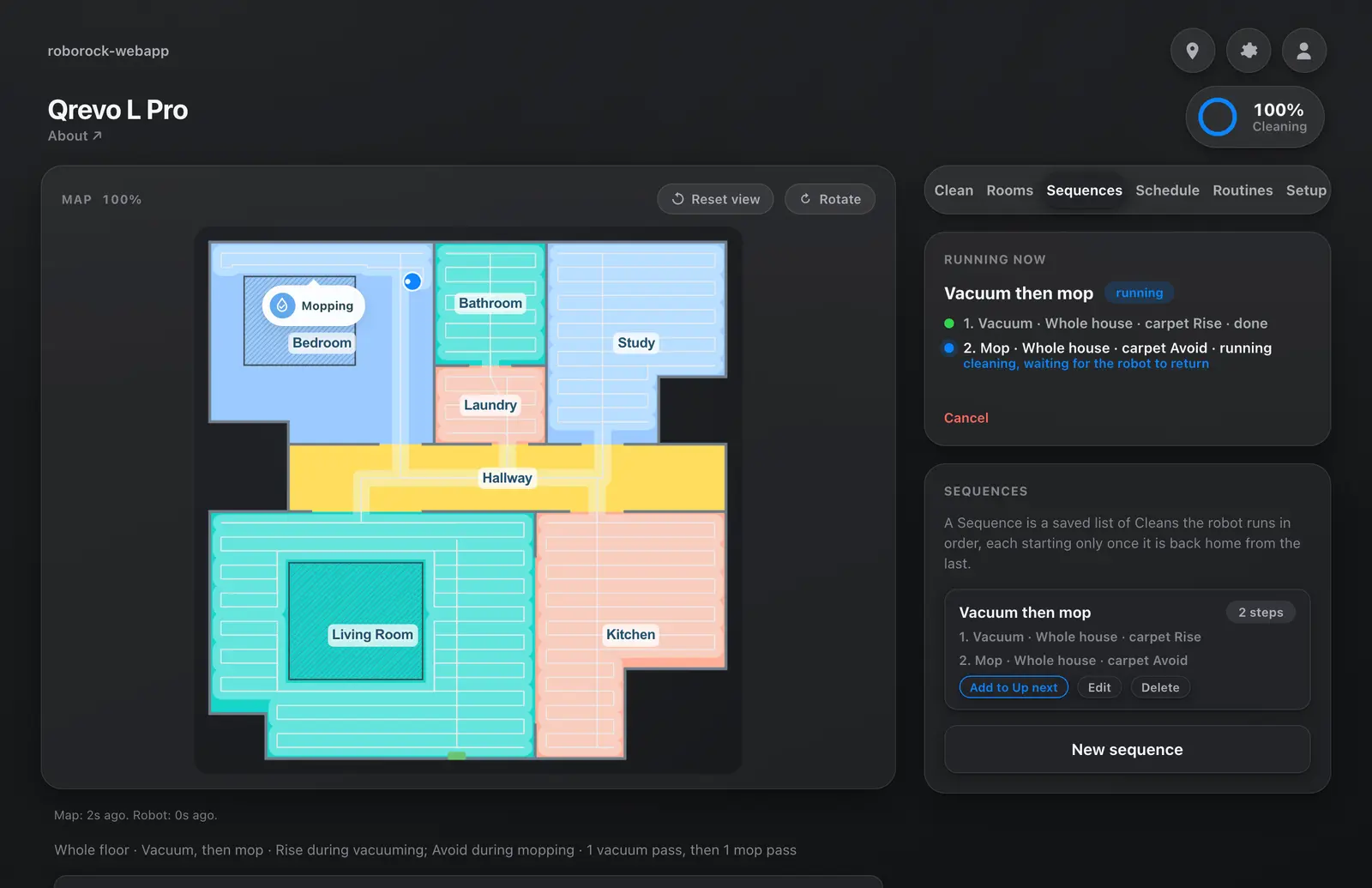
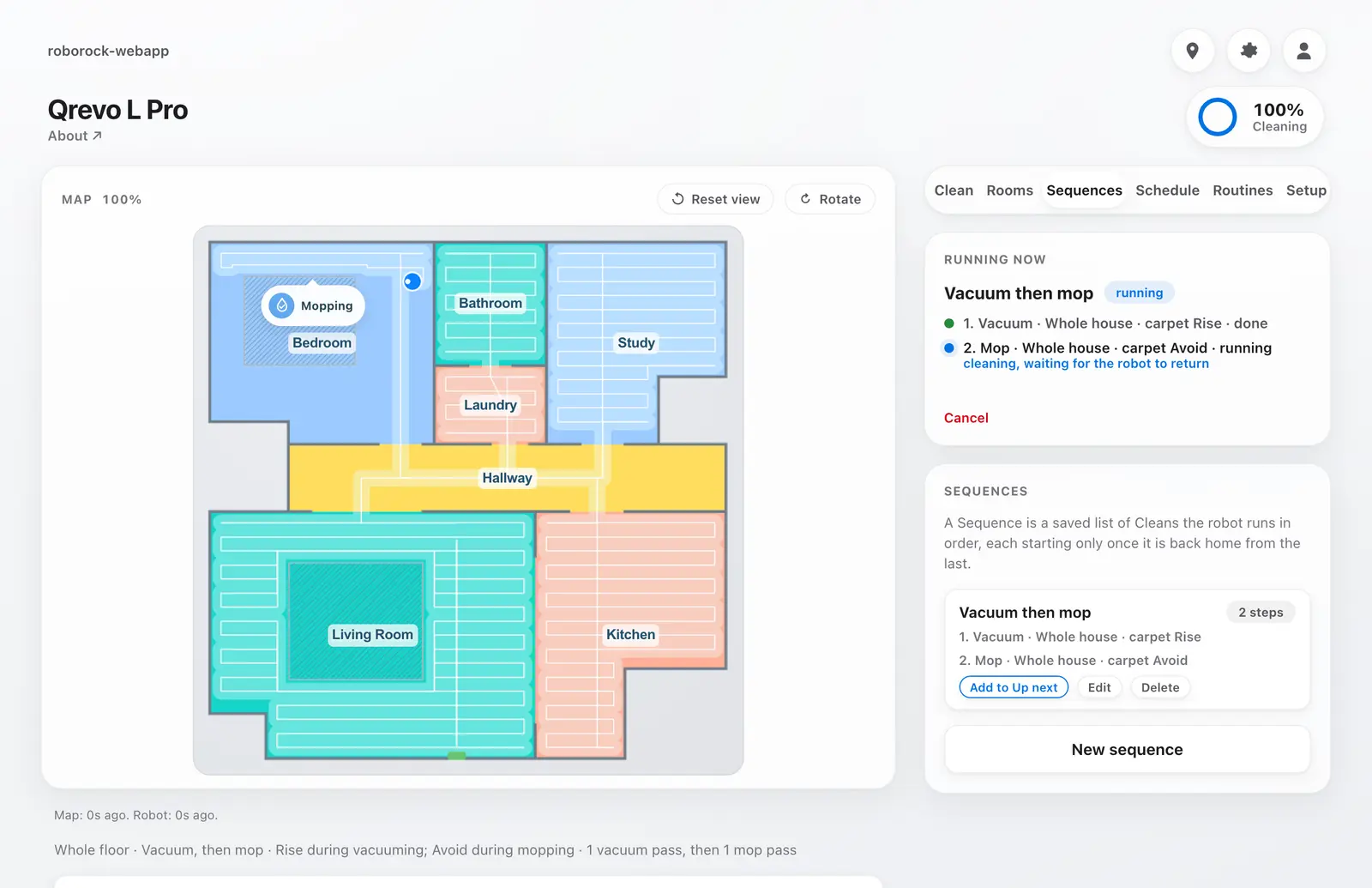
Sequence “Vacuum then mop”: step 1 vacuum, carpet Rise, step 2 mop, carpet Avoid
sped up
roborock-webapp
SHEET 02
The launch film: map, Sequences, Schedule, Up next, and the app installed on a laptop
68 s · sound on
roborock-webapp
Quickstart · fake mode

See it run in about 30 seconds.

Fake mode is a simulated robot in a synthetic apartment. No Roborock account, no robot. It is the same thing the recording above shows.

You need uv, which fetches Python 3.12 if you don't have it. TIMEZONE is the only setting fake mode needs.

zsh
$ git clone https://github.com/zarifaziz/roborock-webapp.git
$ cd roborock-webapp
$ cp .env.example .env    # set TIMEZONE to your IANA zone
$ uv sync
$ uv run uvicorn roborock_auto.adapters.web.server:app --host 127.0.0.1 --port 8000

Open http://127.0.0.1:8000, go to Sequences, pick “Vacuum then mop”, save and press Run. A two-step run takes a little over a minute. Going live with your own robot is a few more steps in the README.

01Sequences

Chain cleans that wait for the robot to come home.

A Sequence is an ordered list of Steps. Each Step is its own clean with its own rooms, mode and carpet behavior. The next Step starts only once the robot has left the dock, cleaned, and returned idle.

Step 1carpet Rise

Vacuum

whole house · mop lifted · carpets included
leave dockcleanreturn idle
home and idle,
not just docked
Step 2carpet Avoid

Mop

whole house · carpets skipped
leave dockcleanreturn idle
A recharge is not “done”.Docked and charging mid-job leaves the job active, so the next Step keeps waiting.
One run at a time.Web or scheduled, only one run drives the robot. Ask while it is busy and the clean waits in Up next.
Cancel is safe.Cancelling sends the robot home and leaves carpet mode at Avoid.
02Carpet-aware

The mop never touches the rug.

The official app has one global carpet setting. The built-in Two-Stage Clean switches it per Step: vacuum with carpet mode Rise, then mop with carpet mode Avoid.

Step 1 · vacuumRise
RUG
Mop lifted, carpets included. The rug gets vacuumed with the rest of the floor.
Step 2 · mopAvoid
RUG
Carpets skipped. The mop goes around the rug, so nothing wet lands on it.
03Guardrails

Checked before it moves, scheduled without cron, and an assistant that only proposes.

Read-back verification

Set it, read it back, then start.

Before a clean starts, the app sets the cleaning mode and the carpet mode, reads both back from the robot, and refuses to start if they don't match what you asked for.

set mode=vacuum  read vacuum ok
set carpet=Rise read Rise   ok
start the clean you asked for
or, on a mismatch:
set carpet=Avoid read Rise refuse
Schedules

Weekly rules and room intervals.

Schedule Rules fire a clean or a saved Sequence on a weekly grid. Room Intervals say how often a room should be cleaned and list what is overdue. The scheduler runs inside the app process.

M
T
W
T
F
S
S
09:00
10:30
Claude assistant · optional

It proposes. You confirm.

Describe a clean in plain words and get a plan to review. Nothing moves until you confirm it. The assistant has no robot, filesystem or shell tools.

vacuum the kitchen including carpets twice
Proposed clean
  1. Vacuum · Kitchen · carpet Rise · 2 passes
ConfirmDiscard
The app in light mode: a Sequence running, step 1 done, step 2 mopping
Light
The app in dark mode: a Sequence running, step 1 done, step 2 mopping
Dark · installable as a PWA
04How it talks to the robot

Through Roborock's own cloud, via python-roborock.

The app uses python-roborock, the community library behind the Home Assistant integration. It logs in through Roborock's cloud with your account and sends commands over Roborock's MQTT broker, or over local TCP when the robot is on your LAN.

An unofficial API.There is no SLA and Roborock can change it at any time. The adapter deliberately does not reconnect on every failure, because the login endpoint is rate limited. Your robot keeps working with the official app either way.
The web app has no login of its own.Anyone who can reach the port can drive your robot. Keep it on 127.0.0.1, or put it behind something that authenticates: a VPN or tailnet, or a reverse proxy with auth.
05For developers

Ports and adapters, with a fake robot that is first class.

A small domain core with the vendor library kept at the edge. The fake adapter simulates depart, clean and return on a clock, which powers both the demo and a test suite that needs no account.

web UI · scheduler · cron · CLIdriving adapters
application/Sequence runner, Up next, scheduler, retry
domain/ + ports/value objects, policies, role-split interfaces
roborock_cloud
fake
sqlite
driven adapters
400+tests, no account needed
~4sfor the whole suite on a laptop
  1. roborock.* is imported in exactly one package. A vendor type or firmware integer outside adapters/roborock_cloud/ is a bug.
  2. Robot knowledge lives in pure policies. “Docked and charging mid-job does not mean done” is a function in domain/policies.py, not adapter logic.
  3. Every port method lands in the fake too, in the same change as the live one.

ARCHITECTURE.md · CONTEXT.md · docs/adr

06Supported devices

Built on one robot. Device reports welcome.

built and tested

Roborock Qrevo L Pro

Every feature on this page was built and run against this model.

should work, untested

Other Roborock vacuums

Models supported by python-roborock should work, but none have been tested. If you try one, open an issue with what worked and what didn't. PRs for other devices are welcome.

Try the fake robot, then point it at yours.